








Book a demo

BuildFlow - Construction & Fitout Management System
Unlimited users
Unlimited transactions
Fully customisable
Full source code
AI agents — FREE
Suite integration
BuildFlow by Royex - Custom Construction & Fitout Management System
Agentic AI That Keeps Your Construction Projects on Track
BuildFlow by Royex leverages agentic AI to actively manage construction and fitout projects, rather than just track them. From predicting schedule delays and prioritizing critical tasks to flagging potential cost overruns and suggesting resource adjustments, the AI works like an intelligent project coordinator embedded in your workflow. It helps project managers stay ahead of issues, optimize team performance, and ensure deadlines and budgets are consistently met, reducing manual oversight while improving project outcomes.

Built for UAE Construction & Fitout Companies
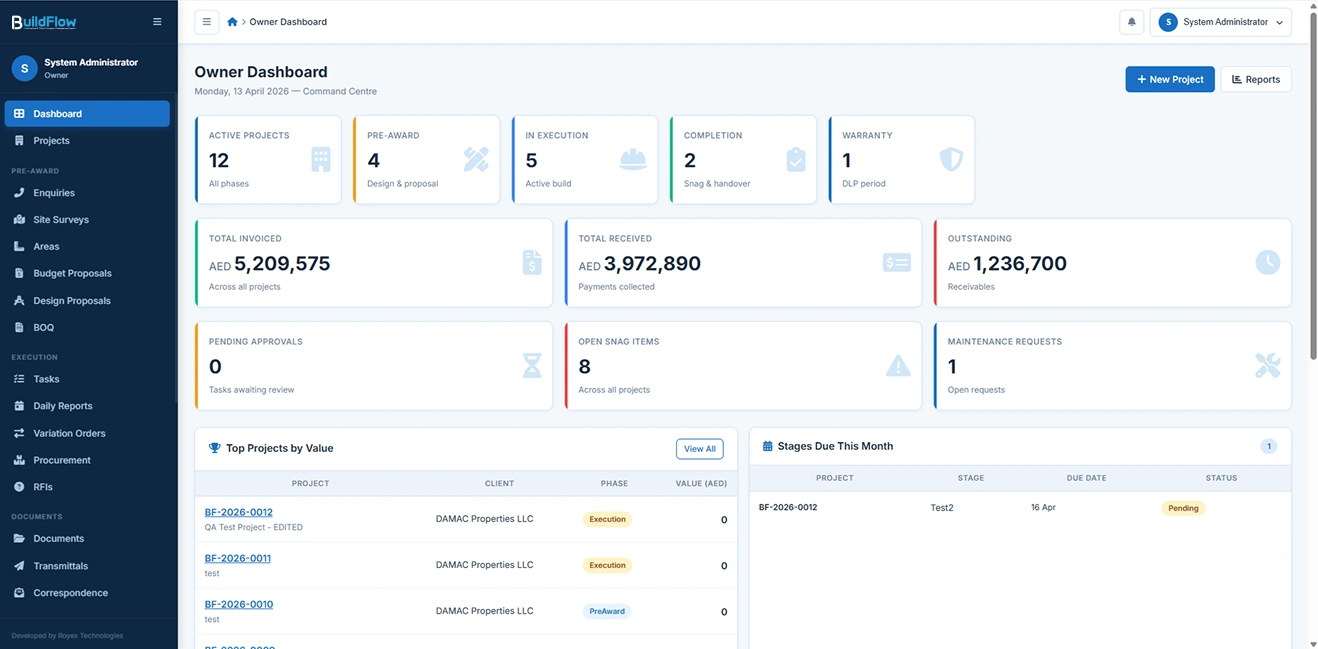
BuildFlow is a cloud-ready, end-to-end project management system designed specifically for contractors and fitout companies operating in the UAE. It consolidates every project phase — from pre-award enquiry to post-handover warranty — into a secure, role-based web application. Unlike generic PM tools, BuildFlow speaks the language of fitout: BOQs, snagging, variation orders, DLP periods, retention management, RFIs, transmittals, and authority inspections are all first-class features.

SitePulse
Monitors all active construction and fitout projects in real time, tracking progress, delays, and on-site activity. It gives project managers a live view of what’s happening across sites, helping them stay ahead of issues and keep timelines under control.

PlanForge
Structures project plans, timelines, and execution stages based on project scope and requirements. It ensures every phase—from design to handover—is clearly defined, scheduled, and aligned with overall delivery goals.

ResourceGrid
Optimizes allocation of labor, materials, and equipment across projects. It analyzes availability and demand to prevent shortages, reduce idle resources, and keep operations running efficiently.

CostGuard
Tracks project budgets, expenses, and cost variations in real time. It identifies overruns early, highlights financial risks, and ensures projects stay within approved budgets.

FieldSync
Connects on-site teams with office operations by centralizing updates, reports, and communication. It ensures that site engineers, contractors, and managers are always aligned with the latest information.

QualityShield
Maintains quality standards by tracking inspections, snag lists, and issue resolution. It ensures that all work meets required specifications before moving to the next stage or final handover.

Pre-Award Module
The pre-award module manages the full sales and estimation pipeline before a contract is signed.
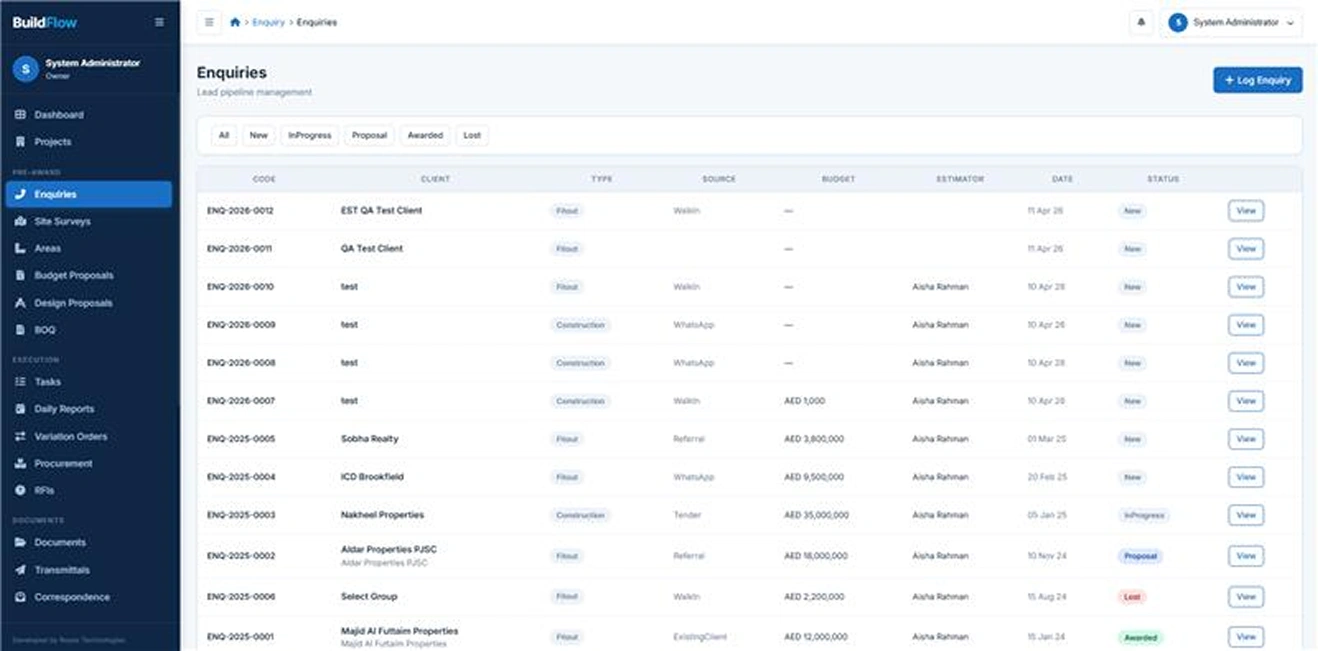
Enquiry Management
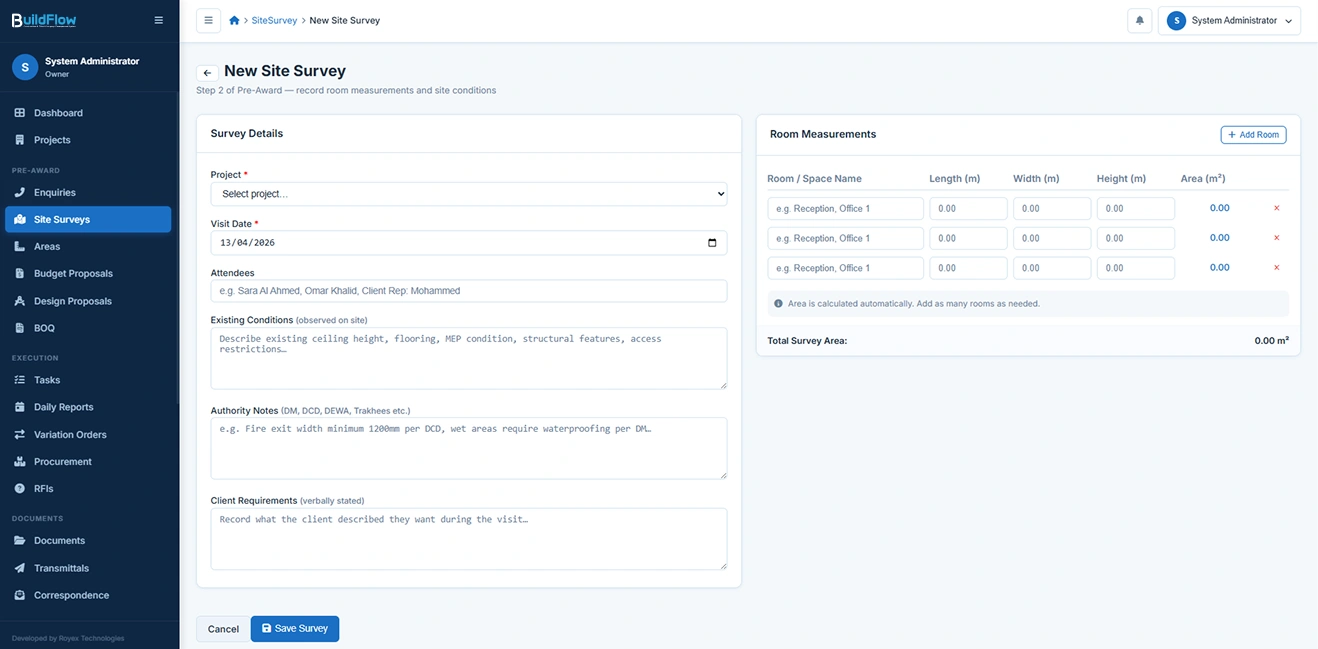
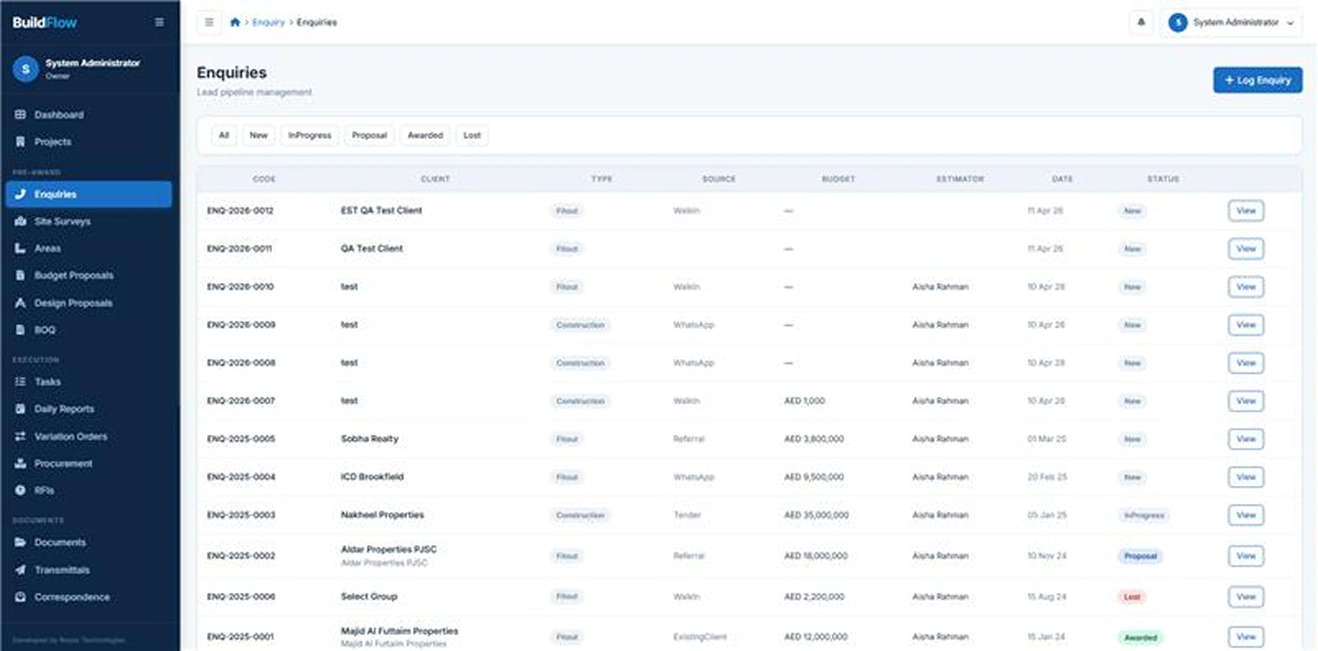
Capture and manage all incoming project enquiries in a structured pipeline. Each enquiry includes client details, location, source channel (WhatsApp, referral, tender, etc.), indicative budget, and assigned estimator and architect. This ensures full visibility from initial lead to project conversion.
Enquiry Status Pipeline
Track every enquiry through a clear lifecycle: New → In Progress → Proposal → Submitted → Awarded → Lost. Once an enquiry is awarded, it can be converted into a live project instantly with a single click, ensuring seamless transition from pre-sales to execution.
Bill of Quantities (BOQ)
Create detailed, structured BOQs broken down by sections and work items. Each BOQ includes item codes, descriptions, quantities, unit rates, and automatic subtotal calculations. The system also supports preliminaries, contingencies, and automatic application of UAE VAT (5%) where applicable.
BOQ Approval Workflow
Submit BOQs for client or owner approval through a controlled workflow. Once approved, the BOQ is locked to prevent further edits, and the final contract value is automatically carried into the project record.
BOQ Versioning
Maintain full control over scope changes with BOQ versioning. Users can create revised versions as project requirements evolve, while preserving a complete historical record of all changes for audit and comparison purposes.

Document Management & Version Control
Full ISO-standard document control built in — no separate DMS required.
Document Register
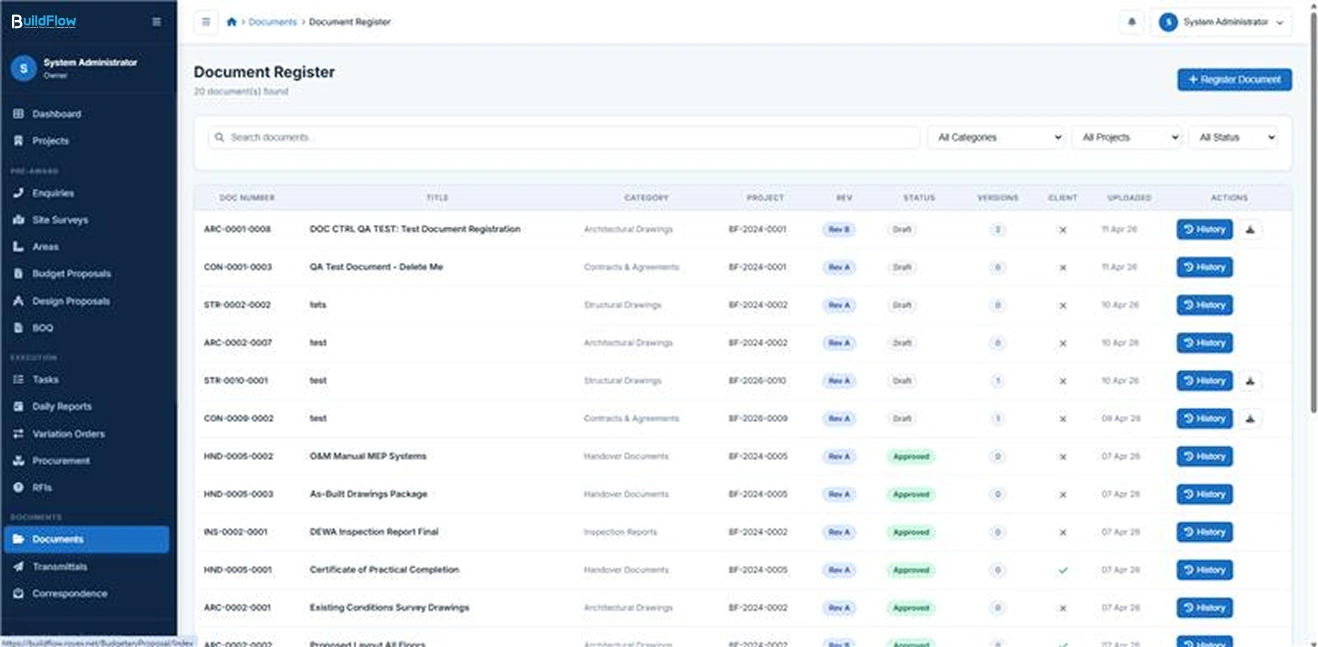
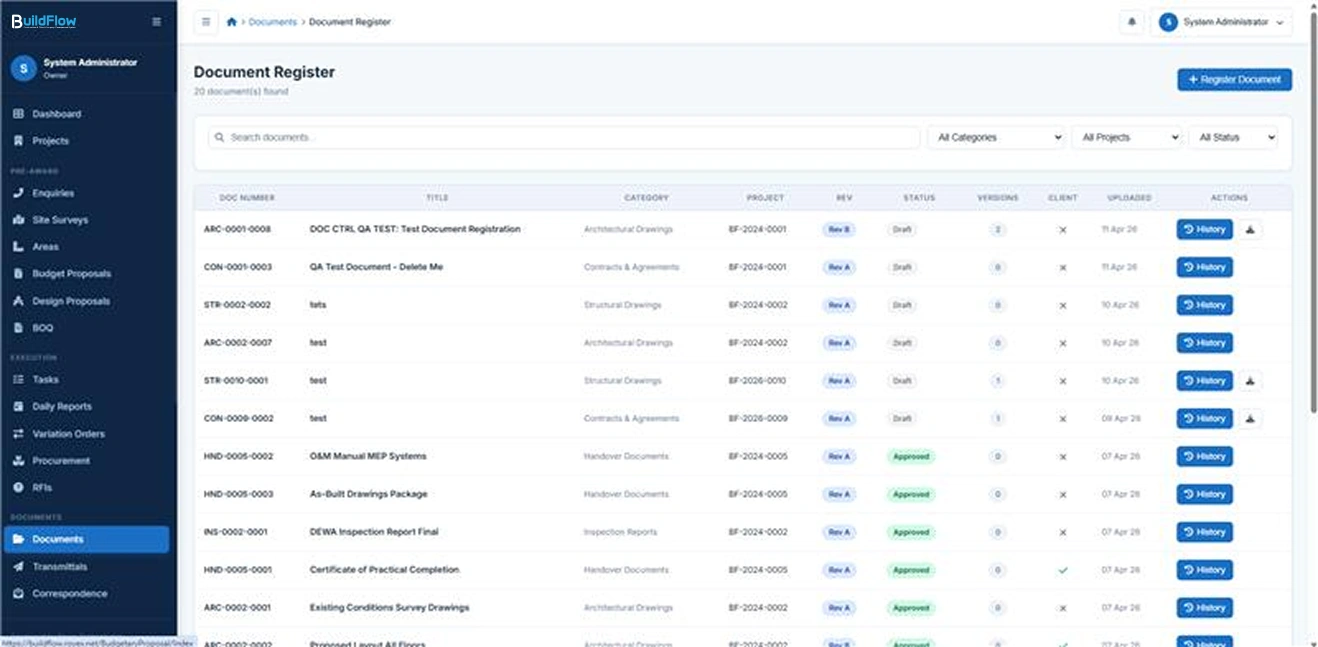
The system provides a centralized register for all project documents, capturing essential metadata such as document number, title, category, current revision, status, and a client-visibility flag. Documents can be efficiently filtered by project, category, or status, ensuring quick retrieval and full control over document governance across the project lifecycle.
Version History
Every document maintains a complete revision history, following structured versioning such as Rev A, Rev B, Rev C, and so on. When a new revision is uploaded, previous versions are automatically archived while remaining accessible for download at any time. This ensures full traceability and transparency of all document changes over time.
Document Categories
Documents are organized into standardized categories with predefined numbering prefixes to ensure consistency and classification across projects. These include ARC for Architectural, MEP for Services, STR for Structural, BOQ for Bills of Quantities, CON for Contracts, INS for Inspections, HND for Handover documents, and additional categories as required.
Status Workflow
Documents move through a controlled lifecycle consisting of Draft, For Review, Approved, For Construction, Superseded, and Void. Only documents that have been approved are eligible for inclusion in transmittals or issued for execution, ensuring strict control over document validity and usage.
Client Portal Sharing
Documents can be selectively marked as client-visible, allowing secure sharing through a dedicated client portal. Only explicitly shared documents are accessible to clients, ensuring controlled transparency without the need for external file sharing links.
Transmittals
The system supports formal transmittals that group multiple documents under a single submission. Each transmittal is created with a defined purpose such as For Approval, For Construction, or For Information, along with delivery method tracking and acknowledgement capture to ensure accountability and formal record keeping.
Correspondence Log
An append-only correspondence log captures all formal project communications, including emails, letters, meeting minutes, and official notices. This log is designed as a tamper-proof audit trail, supporting compliance requirements and providing a reliable record for dispute resolution and project governance.

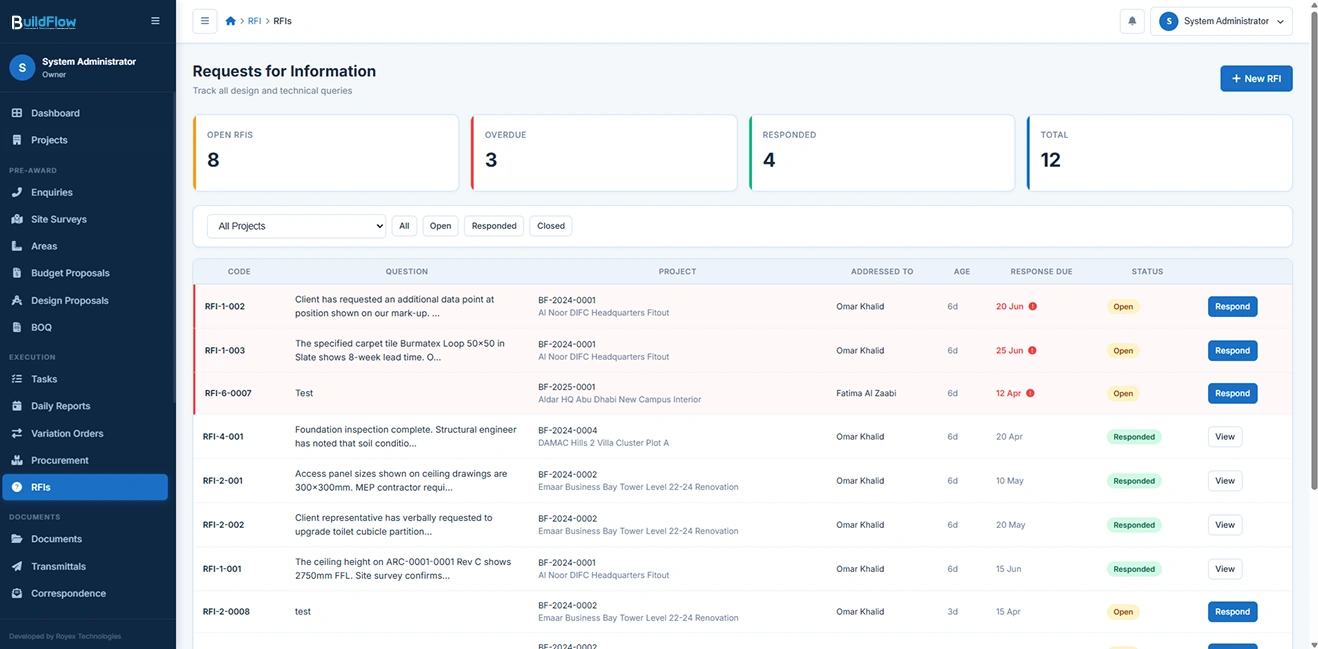
RFI Management
Structured workflow tool that enables teams to log, track, respond to, and resolve project-related information requests.
RFI Register
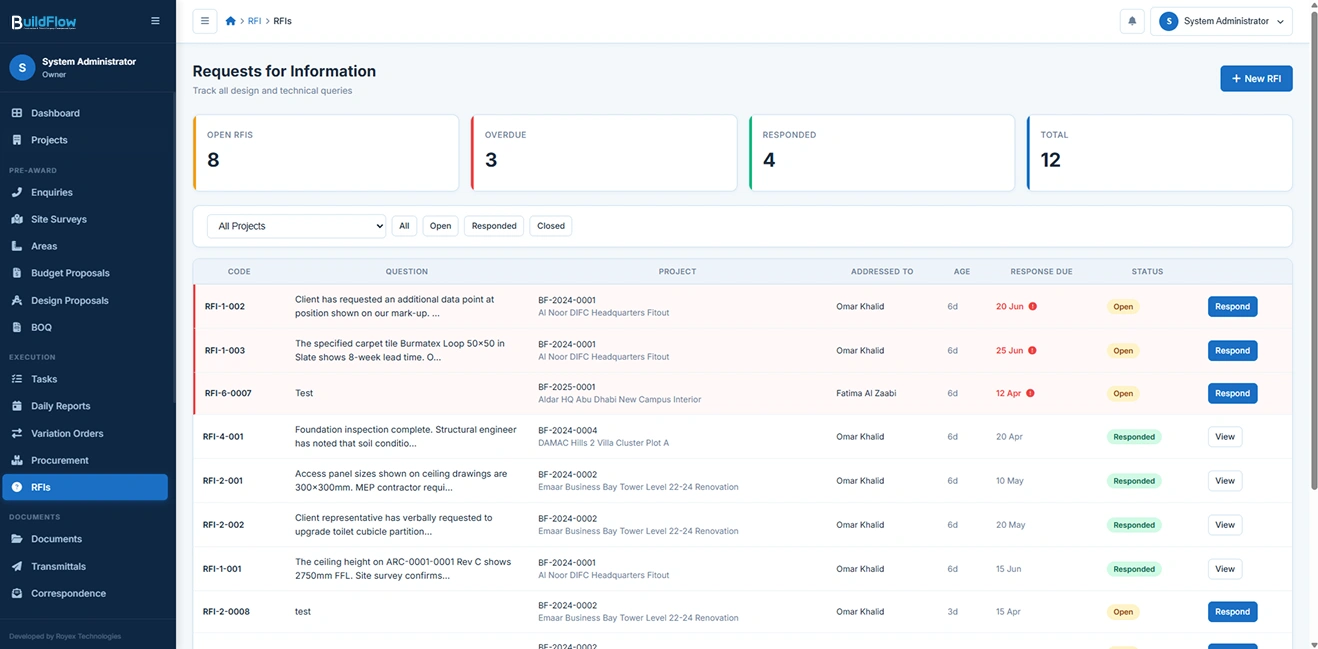
The system maintains a centralized register for all Requests for Information (RFIs) raised across projects. Each RFI can be logged against a specific project and addressed to a designated team member, with supporting reference drawings and a clearly defined required response date to ensure accountability and timely resolution of queries.
Open / Responded / Closed Workflow
RFIs follow a structured lifecycle consisting of Open, Responded, and Closed states. The system continuously tracks the age of each RFI in days and prominently flags overdue items to ensure that pending technical queries are actively monitored and escalated when required.
In-System Response
Architects, project managers, or assigned personnel can respond directly within the BuildFlow system. The full question-and-response thread is preserved within the RFI record, ensuring complete traceability. Each RFI can also be exported as a structured report for documentation, reporting, or client communication purposes.
Cross-Reference to Documents
RFIs can be directly linked to specific drawing numbers or document references, enabling precise traceability between design queries and the exact document revision being questioned. This ensures clarity, reduces ambiguity, and strengthens control over design coordination and documentation accuracy.

AI Sales Training Platform
Structured project change records that document, price, and track approved modifications to contract scope.
VO Register
The system maintains a centralized Variation Order (VO) register, where every change is logged with a unique VO code along with its reason, such as Client Request, Design Change, Site Condition, Authority Requirement, or Omission from BOQ. Each VO also captures cost impact and timeline impact to ensure full visibility of contractual and project variations.
Line Items
Each Variation Order can be broken down into detailed add or remove line items, including description, unit, quantity, and unit rate. The system automatically calculates subtotals, providing real-time visibility of the financial impact of each variation.
Approval Workflow
Variation Orders follow a structured workflow consisting of Draft, Submitted, and Approved states. Once approved, the system automatically updates the project’s revised contract sum, ensuring that all financial records remain accurate and up to date.
Signed VO Tracking
The system records client sign-off dates for every approved Variation Order, ensuring formal acceptance is documented. This serves as a critical reference for contract administration, audit compliance, and dispute resolution.

Daily Site Reports
Structured record of on-site activities, capturing workforce details, work completed, equipment usage, site progress, weather conditions, and key observations.

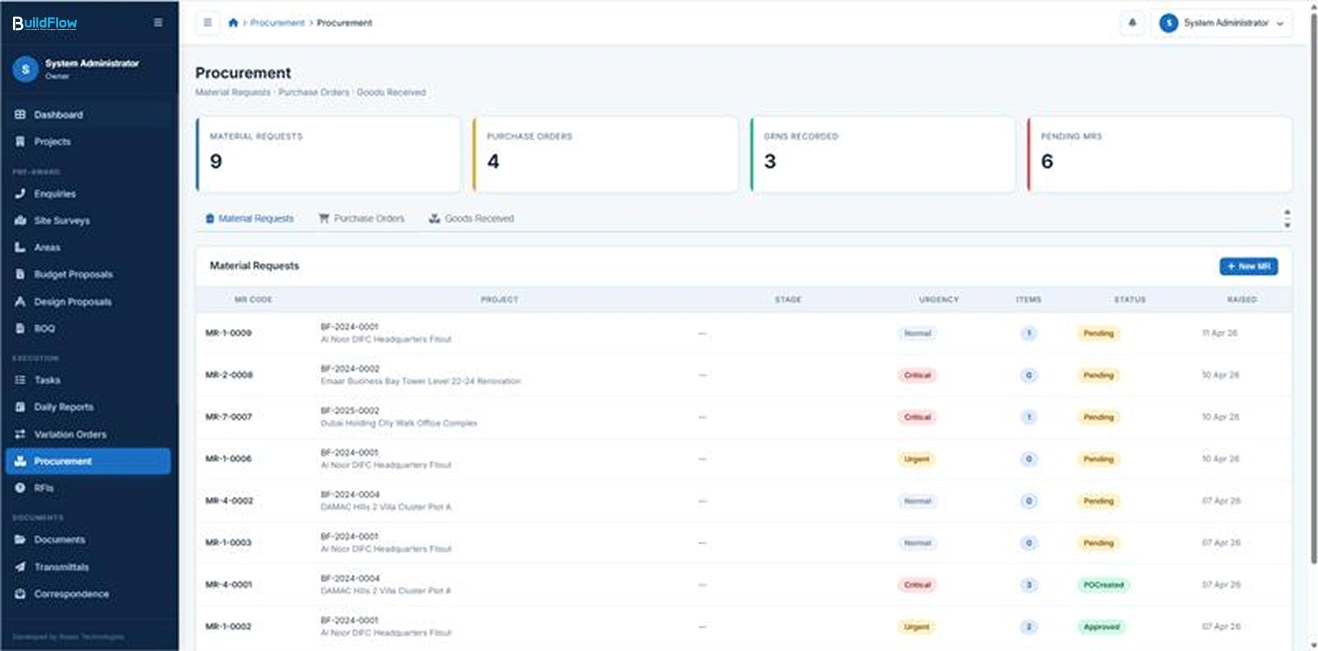
Procurement Management
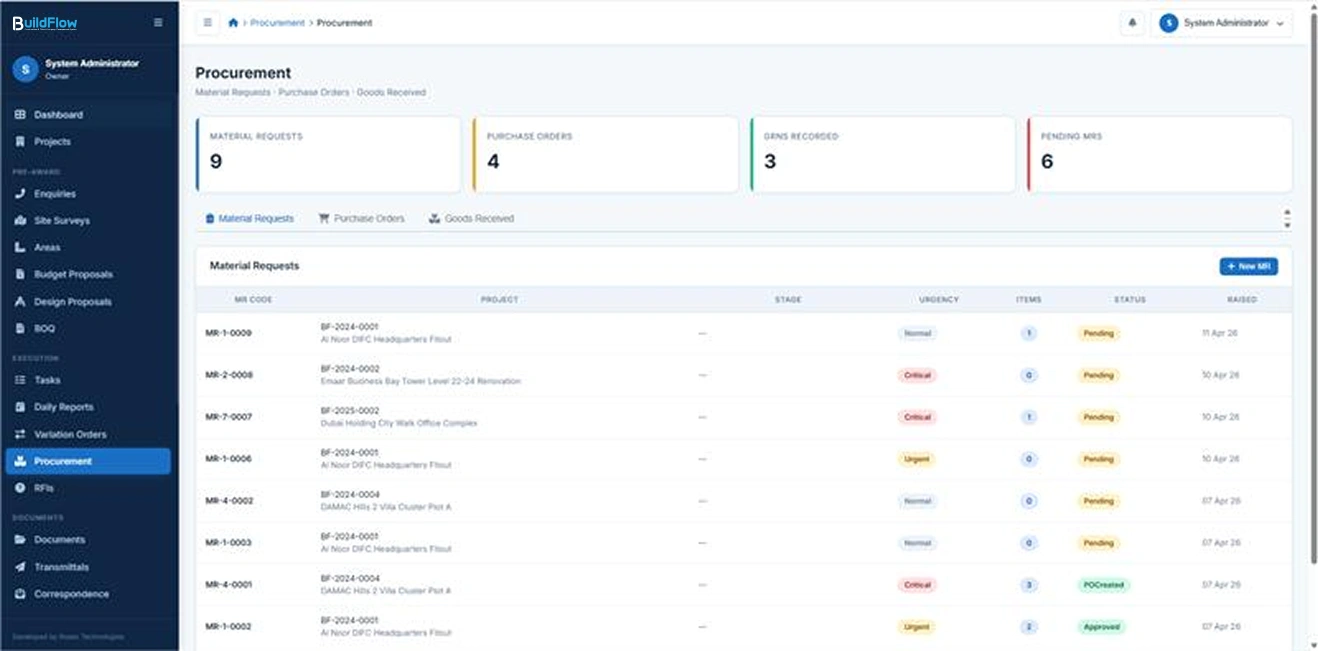
End-to-end control of the purchasing process, from material requisition and supplier selection to purchase order creation, delivery tracking, and cost reconciliation.
Material Requests (MR)
Material Requests are raised per project and stage, allowing teams to specify required items, units, and quantities. Each MR follows an approval workflow where it must be reviewed and approved by the Project Manager or Owner before any purchase order is generated, ensuring controlled and budget-aligned procurement.
Purchase Orders (PO)
Purchase Orders can be generated either from approved Material Requests or created directly when needed. Each PO is linked to a supplier and includes expected delivery dates, payment terms, and detailed line items. VAT is automatically calculated, ensuring accurate financial documentation and compliance.
Goods Received Notes (GRN)
Goods Received Notes are used to record and validate deliveries against purchase orders. Each GRN captures delivery date, condition assessment, and relevant remarks. The system supports partial deliveries, with PO status dynamically updated to reflect whether items are fully or partially received.
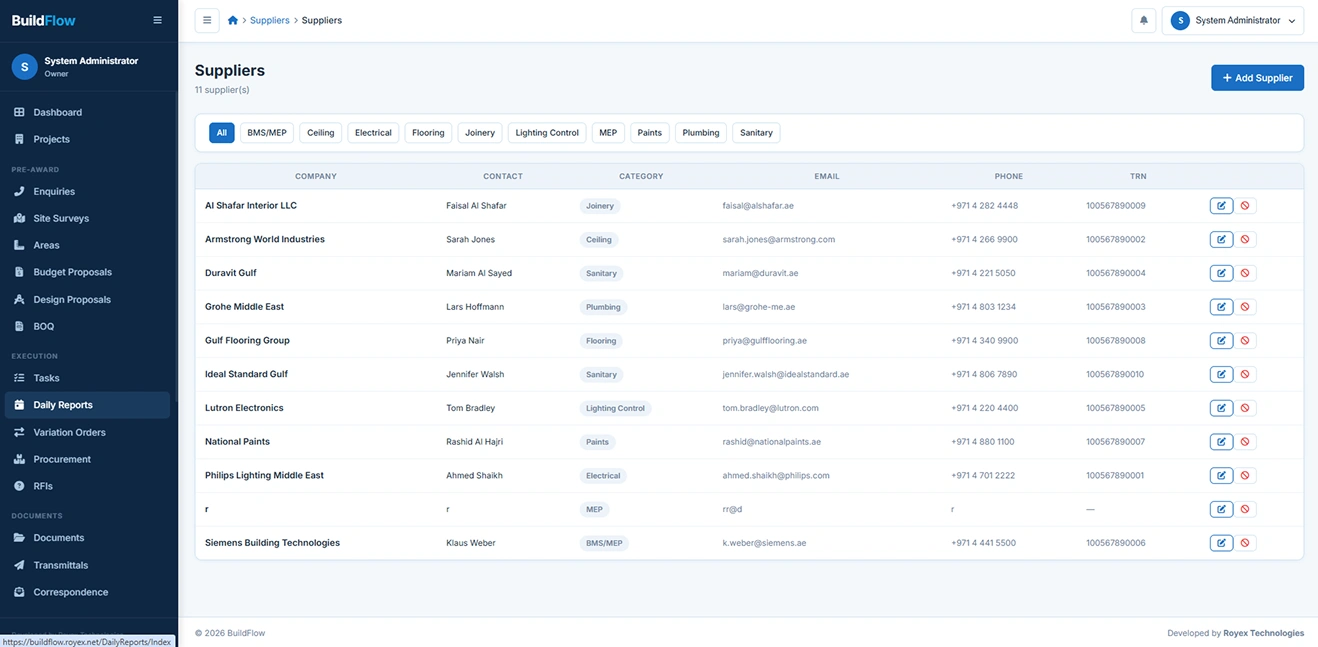
Supplier Directory
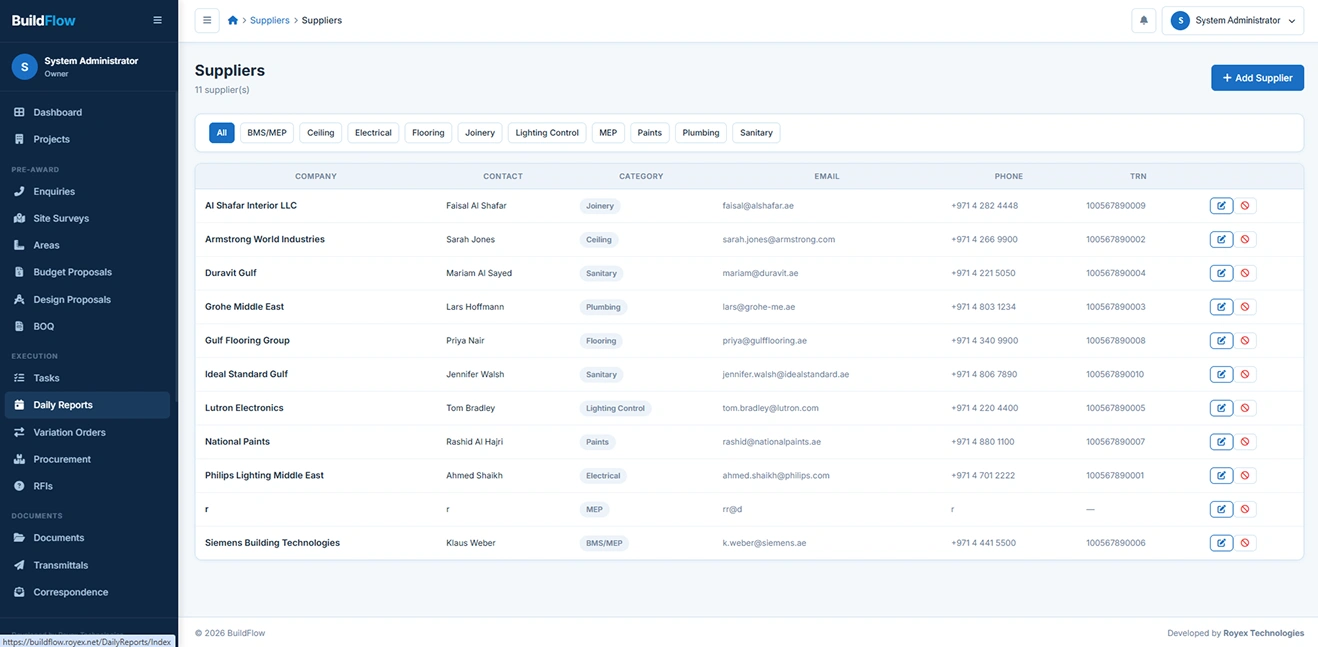
The system maintains a centralized supplier database containing contact details, trade categories such as MEP, joinery, and flooring, TRN information, and full procurement history. This enables quick supplier selection and better vendor performance tracking.
Urgency Flags
Material Requests can be marked as Normal, Urgent, or Critical based on project needs. Critical requests are prominently highlighted within procurement dashboards to ensure immediate attention and faster processing.

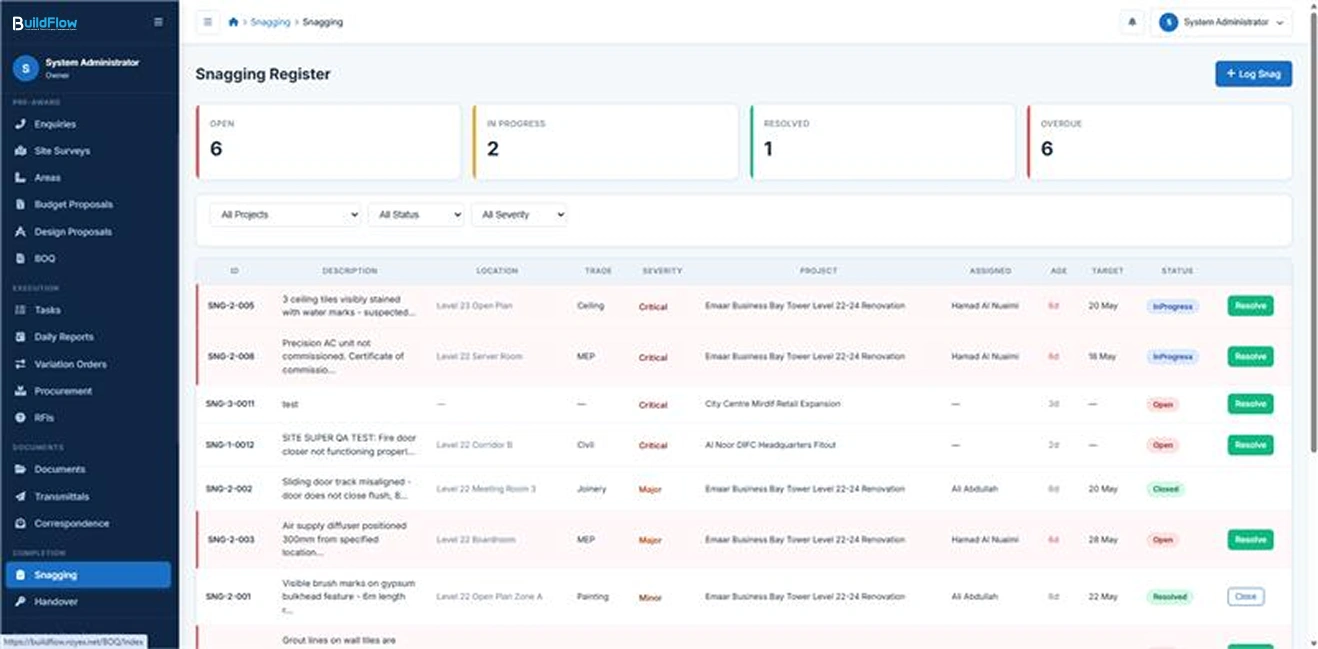
Snagging & Defect Management
BuildFlow replaces paper snag lists and WhatsApp photos with a structured, traceable snagging system.
Snag Item Logging
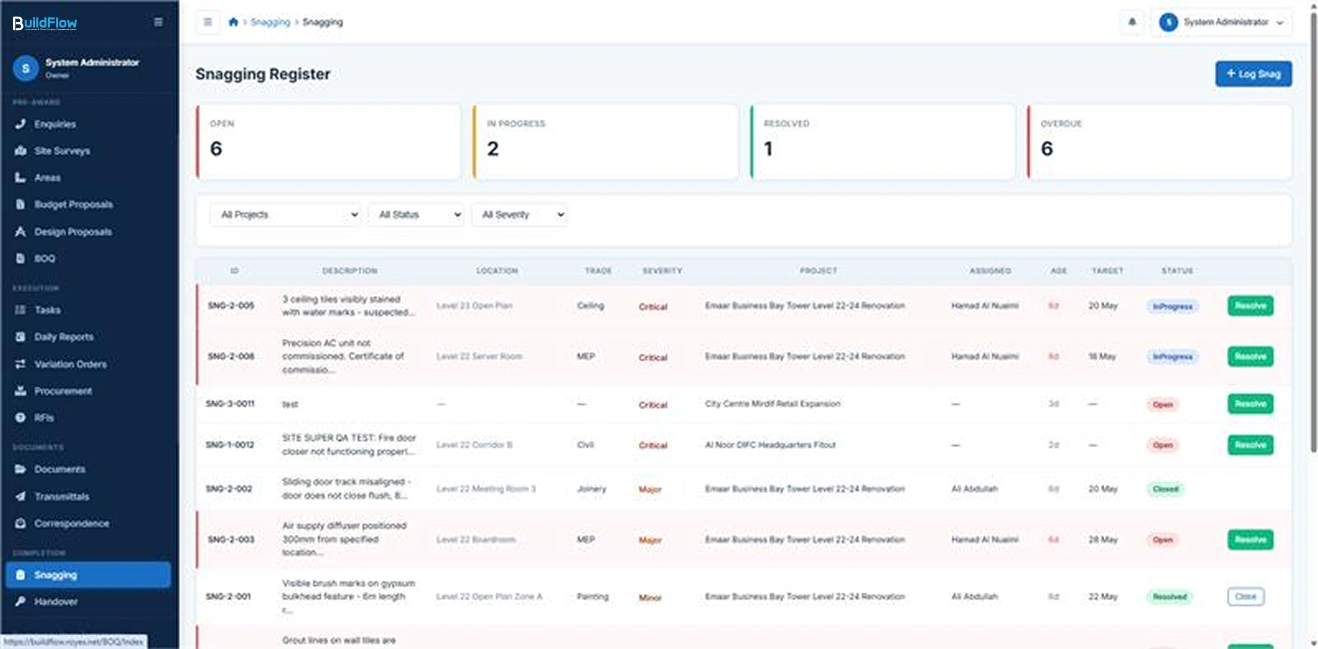
Snag items are logged with detailed information including location, trade, description, severity level (Minor, Major, or Critical), and supporting photo evidence captured before and after rectification. This ensures every defect is clearly documented and traceable.
Assignment & Target Dates
Each snag is assigned to a specific site supervisor along with a defined target resolution date. The system actively tracks progress and highlights overdue snags in red across all dashboards to ensure timely resolution and accountability.
Resolve & Close Workflow
Supervisors update snag status by adding resolution notes and after-photos upon completion of corrective work. Project Managers then review and formally close the snag after verification. A complete audit trail is maintained for all actions throughout the lifecycle.
Snagging Report
The system generates comprehensive snagging reports at both project and portfolio level, providing insights into severity breakdown, trade-wise distribution, aging of open snags, and overall resolution rates for quality control and project performance monitoring.

Invoicing & Financial Management
Complete financial tracking from contract award to final payment — all in AED with UAE VAT compliance.
Payment Schedule Builder
The system enables creation of milestone-based payment schedules for each project, where payments are linked to defined project milestones. Milestones can be automatically triggered upon completion of corresponding project stages, and retention percentages can be configured per milestone to support contractual requirements.
Invoice Generation
Users can generate Standard, Interim, or Retention-Release invoices directly from approved payment milestones. Each invoice is assigned a sequential auto-generated number, with automatic calculation of 5% VAT, ensuring accuracy and compliance with UAE tax regulations.
Payment Recording
All incoming payments can be recorded against specific invoices using multiple payment methods including bank transfer, cheque, or cash. The system supports partial payments and dynamically calculates outstanding balances in real time for accurate financial tracking.
Retention Register
A dedicated retention register is automatically maintained as invoices are paid, tracking withheld amounts and their associated release schedules. Retention release dates are continuously monitored and flagged within the warranty dashboard to ensure timely settlement.
Financial Dashboard
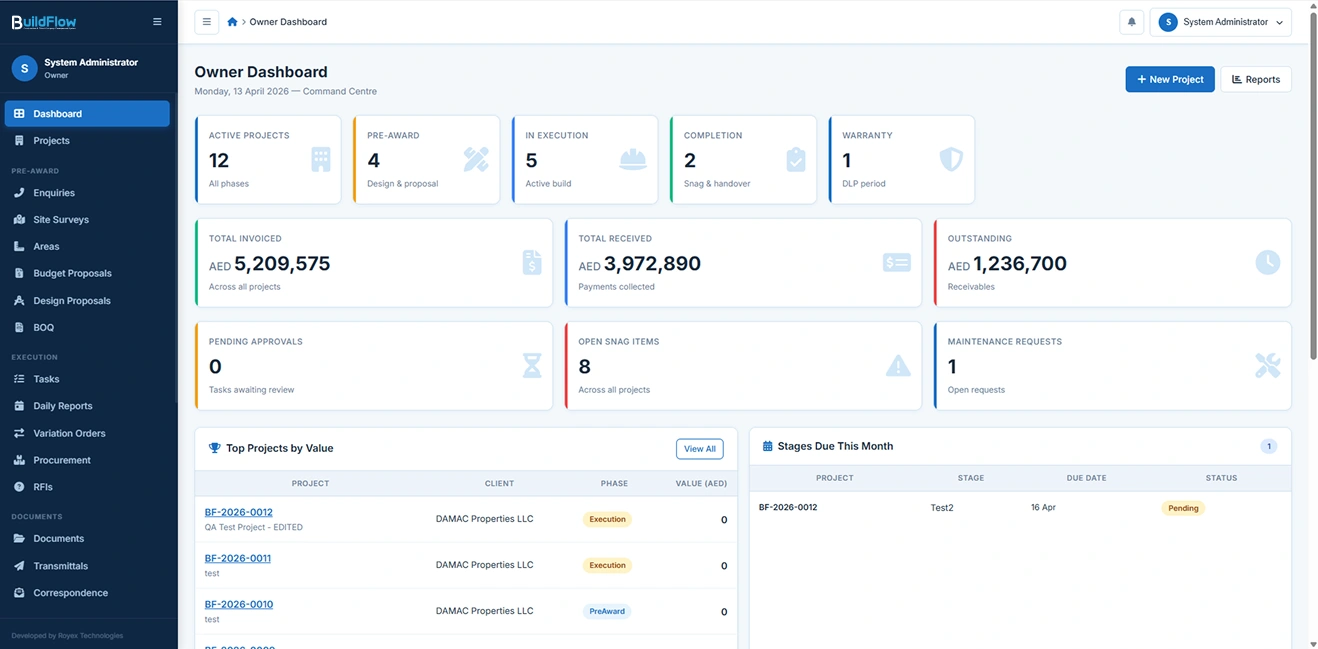
The financial dashboard provides real-time visibility across the entire project portfolio, including total contract value, amounts invoiced, payments received, outstanding balances, and retained amounts, enabling complete financial control and decision-making.
VAT Compliance
All invoices automatically apply 5% UAE VAT with clearly separated subtotal, VAT amount, and total fields. The system is designed to support FTA-compliant reporting, ensuring full regulatory adherence and audit readiness.

Project Management
The heart of BuildFlow — full lifecycle management of every project from kick-off to handover.
Project Register
Maintain a centralized register of all projects with complete visibility of key information, including project code, client details, project type, current phase, progress status, assigned team members, and critical milestone dates. Projects can be easily filtered by phase, project manager, or status for quick access and reporting.
Four-Phase Project Structure
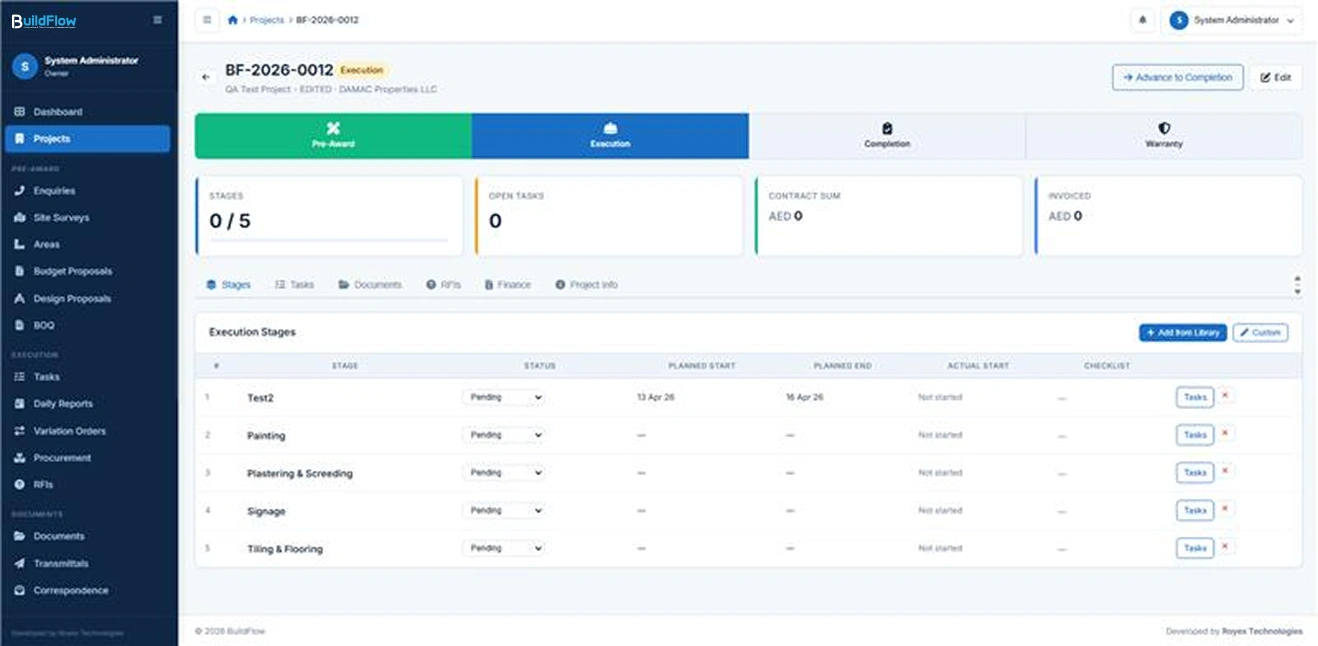
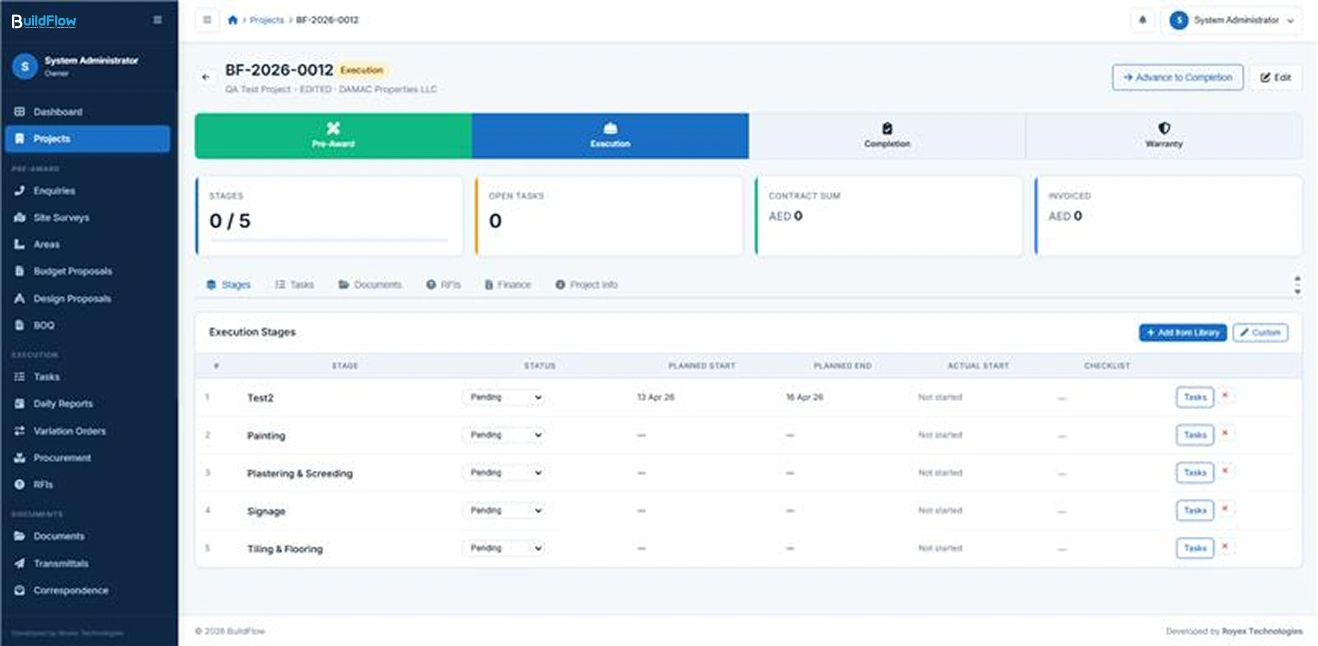
Each project follows a structured lifecycle consisting of Pre-Award, Execution, Completion, and Warranty phases. Phase-based controls ensure that only relevant tools, workflows, and actions are available at each stage of the project lifecycle, improving governance and execution control.
Stage Management
Projects are further broken down into operational stages such as Demolition, MEP, Partitions, Ceilings, and Snagging. Each stage includes defined start and end dates, assigned supervisors, progress status, and a structured checklist to ensure consistent execution tracking.
Stage Checklists
Supervisors can complete and track checklist items within each stage. Completion progress is automatically calculated and displayed as a visual percentage bar, providing real-time insight into stage-level and overall project progress.
Team Assignment
Key project roles including Project Manager, Architect, Estimator, and Site Supervisors can be assigned to each project. The system enforces role-based visibility so users only see and interact with projects relevant to their assignment by default.

Task Management
Create and manage tasks efficiently including workflow and attachments.
Task Creation & Assignment
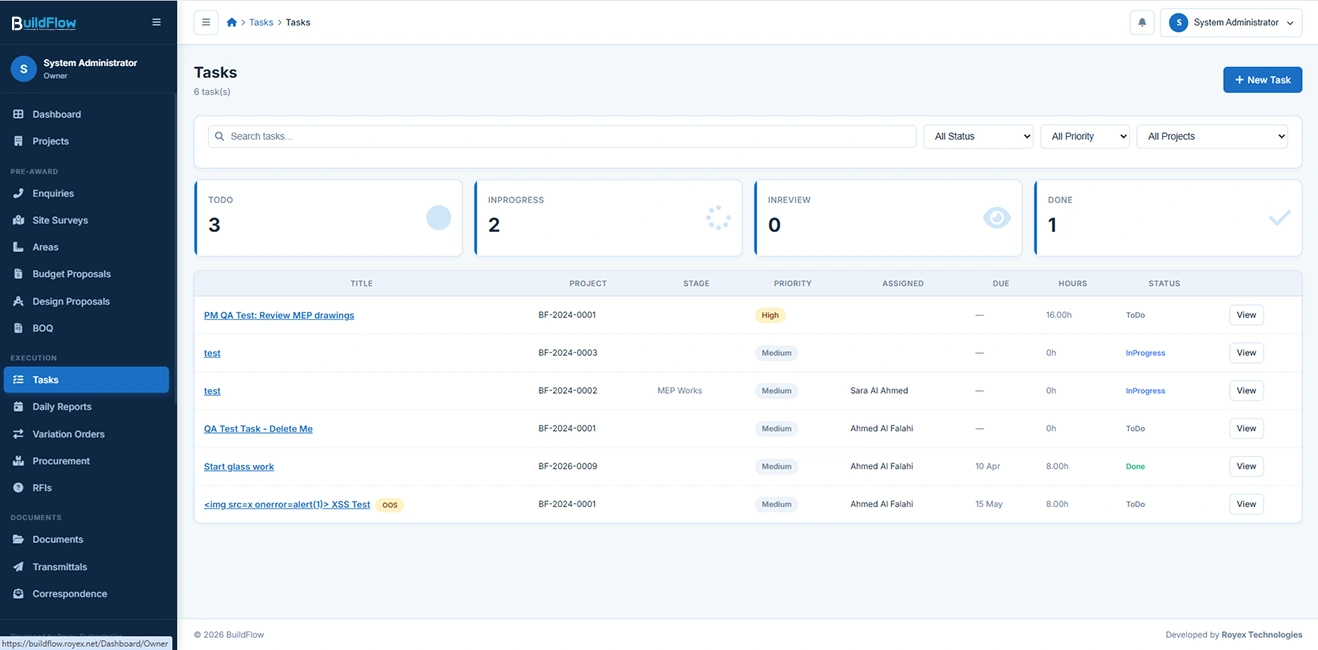
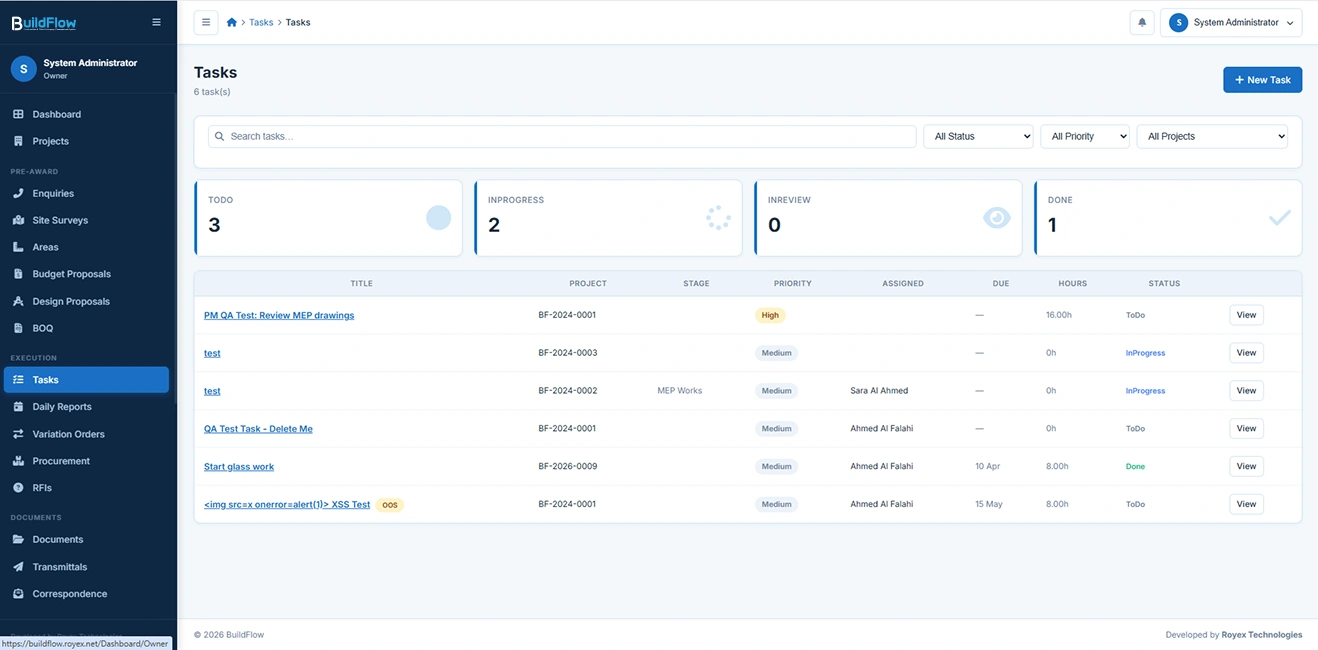
Create and manage tasks linked to any project or stage. Each task includes a title, detailed description, priority level (Low, Medium, High, Critical), category, due date, estimated effort in hours, and assigned user. This ensures clear ownership and accountability across all project activities.
Workflow Status Tracking
Tasks follow a structured workflow: To Do → In Progress → In Review → Done. The system continuously monitors deadlines, automatically flagging overdue tasks in red to ensure timely action and escalation where needed.
Attachments
Users can attach files directly to tasks, enabling documentation of progress, supporting evidence of completion, and easy access to reference materials within the task context.
Sub-Tasks
Large or complex tasks can be broken down into smaller sub-tasks. Each sub-task includes its own title and completion checkbox, allowing granular tracking of progress within larger work items.
Priority Dashboards
Role-based dashboards highlight critical workload insights, including overdue tasks and high-priority assignments across all active projects. This ensures users always have visibility into what requires immediate attention.
Who is BuildFlow for?

Main Contractors
BuildFlow is designed for main contractors who manage multiple large-scale construction projects simultaneously and require full control over project execution, subcontractor coordination, cost tracking, and client communication within a single system.

Interior Fit-Out Companies
It is ideal for interior fit-out firms handling fast-moving, design-intensive projects where BOQs, variations, procurement, and site execution must be tightly controlled and frequently updated in real time.
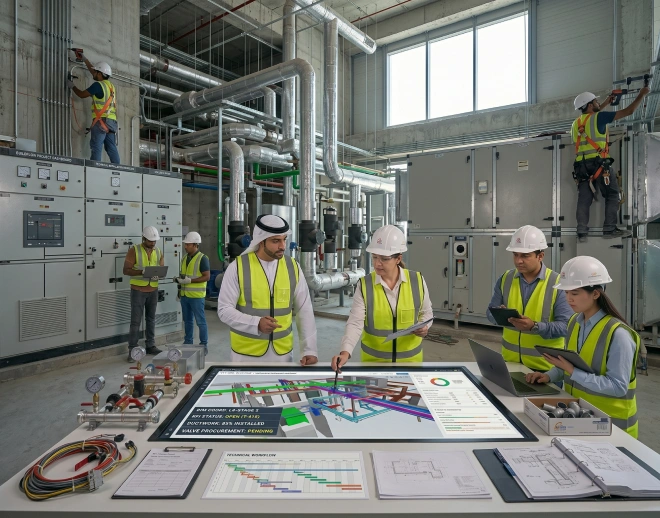
MEP Contractors
BuildFlow suits MEP contractors who need structured workflows for technical installations, stage-based execution, RFI tracking, and precise coordination between design, procurement, and site teams.

Project-Based Construction Businesses
It is also built for general construction and engineering companies operating on a project-to-project basis that require standardized processes, documentation control, and centralized visibility across all active jobs.
Frequently Asked Questions
BuildFlow is a construction and fit-out management system designed to manage the full project lifecycle, including enquiries, BOQs, RFIs, procurement, daily site reporting, documentation, variations, and financial tracking in a single platform.
Yes. BuildFlow covers the full lifecycle from enquiry and BOQ creation to execution, procurement, site reporting, variation orders, invoicing, and final handover with warranty tracking.
RFIs can be logged against projects, assigned to team members, and tracked through Open, Responded, and Closed stages. All responses are recorded in-system and linked to relevant documents for full traceability.
Yes. BuildFlow includes Material Requests, Purchase Orders, Goods Received Notes, supplier management, invoice generation, payment tracking, retention management, and real-time financial dashboards with VAT compliance.
BuildFlow is built for main contractors, interior fit-out companies, MEP contractors, and construction firms that need structured project control, financial visibility, and centralized document and workflow management.
Yes. The system allows detailed BOQ creation with automated calculations, approval workflows, and version control, along with Variation Orders (VOs) that update contract values and track cost and timeline impacts.
Yes. Site supervisors can submit daily reports including manpower, work progress, materials used, delays, and site photos, which are stored in a permanent project archive for reporting and dispute resolution.
BuildFlow enforces structured workflows, approval systems, role-based access, audit trails, and real-time dashboards, ensuring full transparency, accountability, and control across all construction operations.
Do you want to see a demo?
Just fix a time with us and we will be happy to show you the demo
YES,I WANT TOWe Love Our Clients












Blogs & news

Selling Online in the UAE in 2026: Noon vs. Amazon vs. Your Own Store — Which Makes You More Money?
There is a question that comes up in almost every conversation we have with UAE sellers planning to launch online. It usually sounds something like t...
Know More
The Generic SaaS Era Is Ending. The Age of Workflow-Native, AI-Composed Software Has Begun.
The generic, horizontal, seat-priced SaaS model that defined the 2010s is being quietly replaced by something new: workflow-native software, composed...
Know More
If AI Is Taking Care of Software Development, Testing, and Security — What Will Developers Actually Do?
For the first time since the profession existed, the core artifacts a developer produces — code, test suites, security checks — can be generated by a...
Know More
The $200 Billion Question: What Happens to TCS, Infosys and Wipro When Code Becomes Free?
The $200 billion question is not whether AI will disrupt Indian IT services. It already is. The question is whether the industry can reinvent itself ...
Know More
The Seat Is Dead: Why Every SaaS Pricing Page Built Before 2024 Is Already Losing You Money
Per-seat pricing is not dying because it was a bad model. It was a great model. It is dying because the thing it measured — humans doing work in soft...
Know More