










Inspire yourself with these Best Mobile App Wireframe Examples (2025 Edition)
Wireframing is an important step in any screen design process. It’s a wise choice for most of UX/UI designers tend to do a quick wireframing. It primarily allows to define the information hierarchy of app design and can make it easier to plan the layout according to how you want your user to process the information.
If you are going to wireframe a mobile app, remind it that any development projects before production; is key to success in big projects without messing up the final product. Mobile app wireframes let the designers and developers build their websites better. Here we will introduce you with some of different but excellent wireframe templates covering subjects of profile, music, weather, sports, food, community, etc. We hope it will inspire you in many ways.
1. TickTick
Type: Task management App, Tool
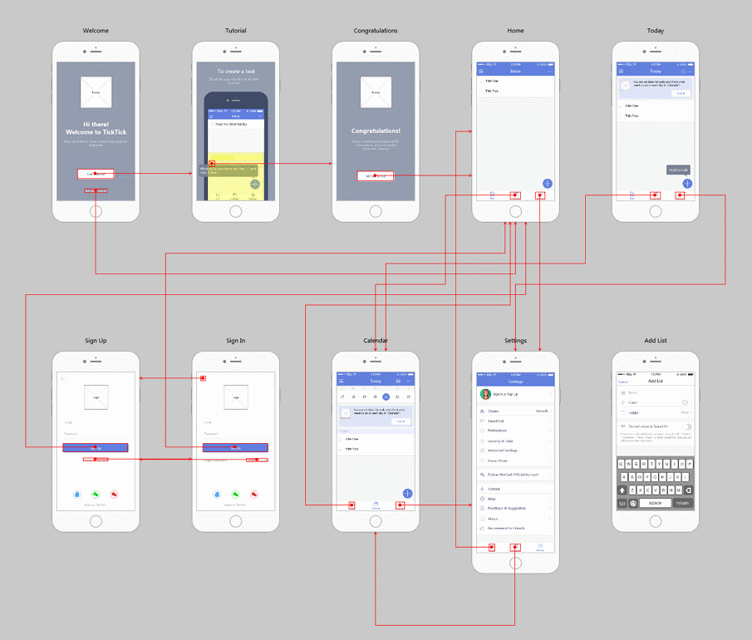
TickTick is an incredible task management app with an especially fantastic animated tutorial. This tutorial embraces the method for communicating with clients and includes a genuine mobile phone interface together to direct them.
2. Colorclouds
Type: App, Weather
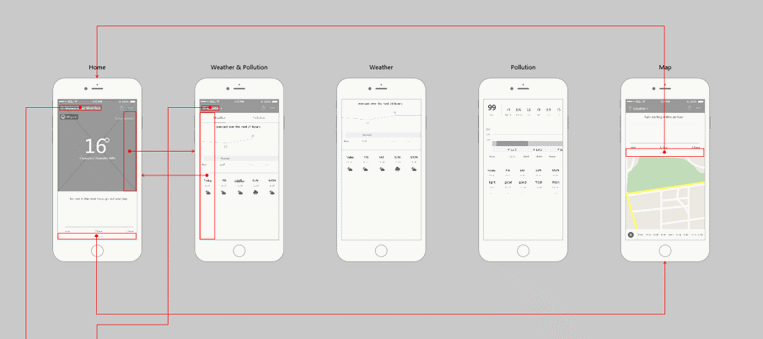
ColorfulClouds that defines a beautiful weather app. It can perfectly forecast the weather updates, air pollution, future rainfall and other weather conditions. It’s Homepage has flat weather illustration which is the most excellent part of the app. Pages of this prototype: Login, Home,Weather, Weather & Pollution, City, Settings and Help, etc.
3.Onefootball
Type: App, Sports
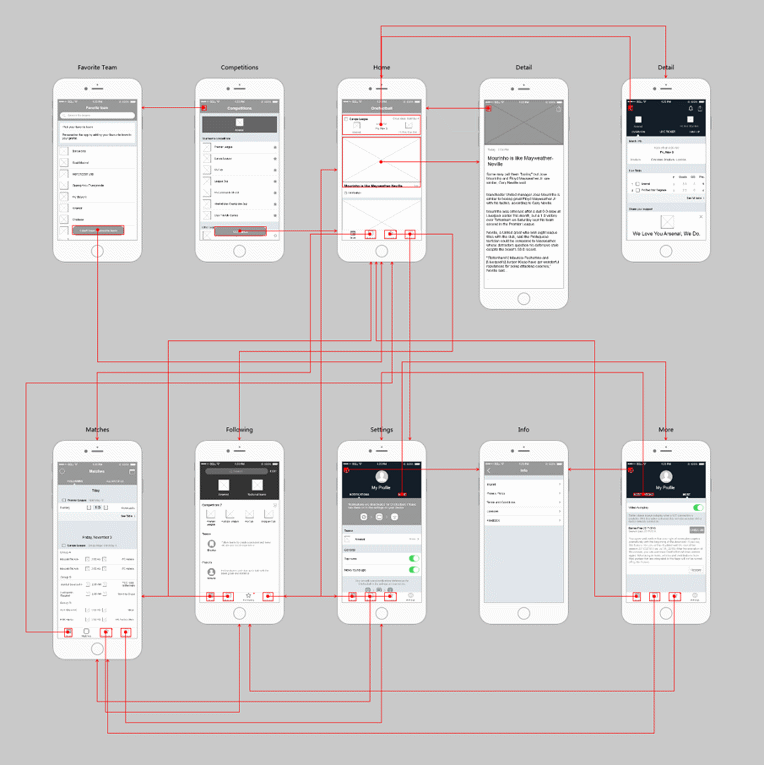
Onefootball is an app of football for football lovers. It offers statistics, scores, live videos and breaking news of over hundred international football club leagues and competitions. The primary page named "Favorite Team" has a coasting button that could be effectively drawn closer by utilizing a Scroll Box part to set a moving football crew rundown and afterward including a button over the looking over region.
4.WeUI
Type: App, Community
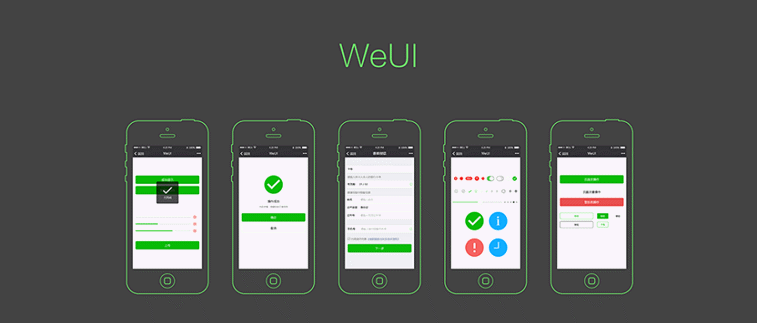
WeUI is one of the best community APP wireframe example. The key features of WeUI are the upload and notification, form error, operation succeeds, etc. The shapes and icons can simply get from the Mockplus icon library.
5. Qello-Concerts
Type: App, Music
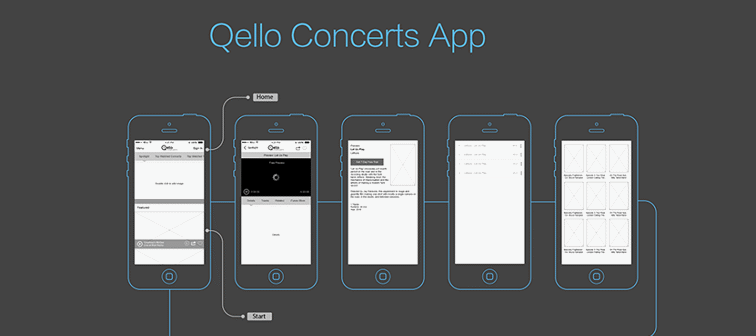
Qello Concerts is an unique wireframe example for Music App. The main pages of the app including home, top watched concerts, spotlight, browse, new releases, etc. This can be executed quickly by using sliding drawer, pop-up panel and other pre-designed elements.
6. Recipes
Type: App, Food
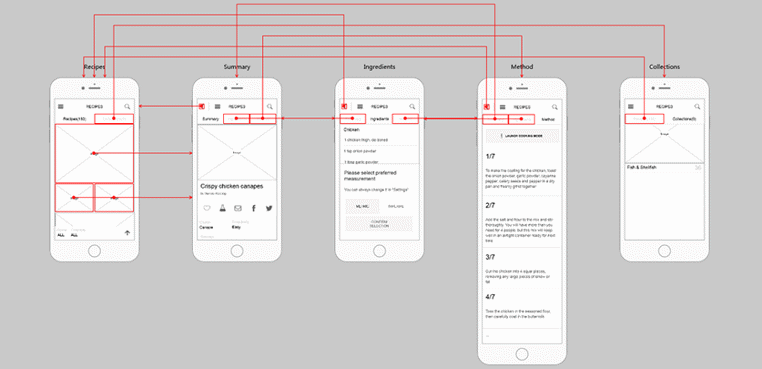
Recipes is designed for food app to delicate your life. By this food app you can get the recipes easily that you need. Eye catching food images attract the users so easily. The designer uses sliding menu that can be realized with Sliding Drawer element in Mockplus. The auto image fill feature will help you to make excellent prototype quickly.
7. Way of Life
Type: App, Management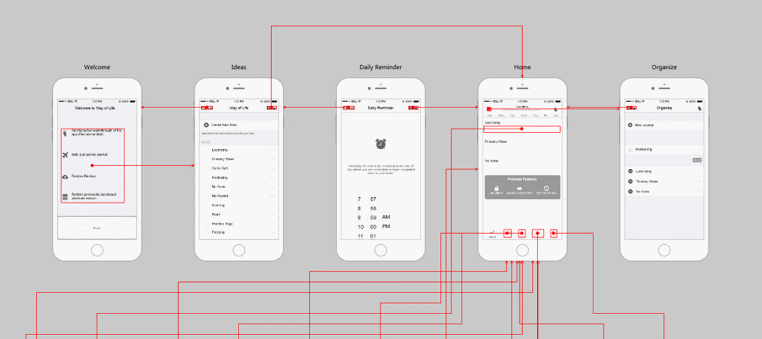
Way of Life is an App which helps you recording and managing your every step of life. Those whom are not very good at balancing time , this app often works a lot for them. In this prototype, a time picker is used to set the alarm and some scrolling numbers are used to set times.
8. Swipes
Type: Efficiency tool APP
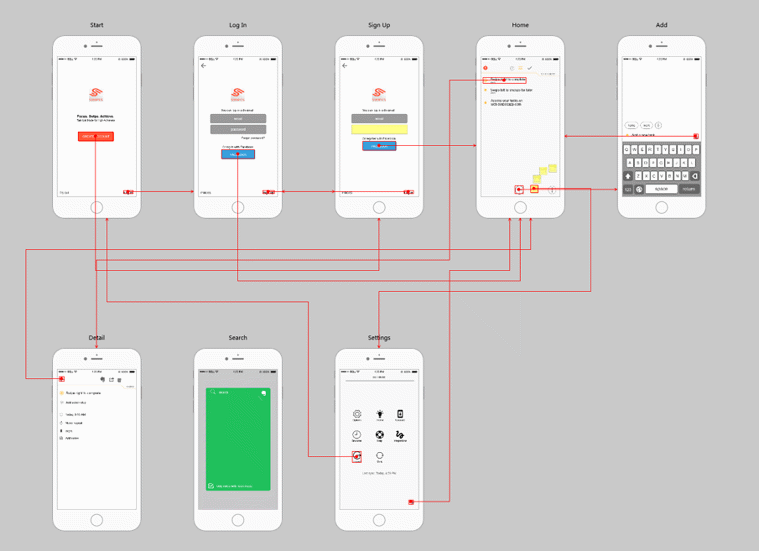
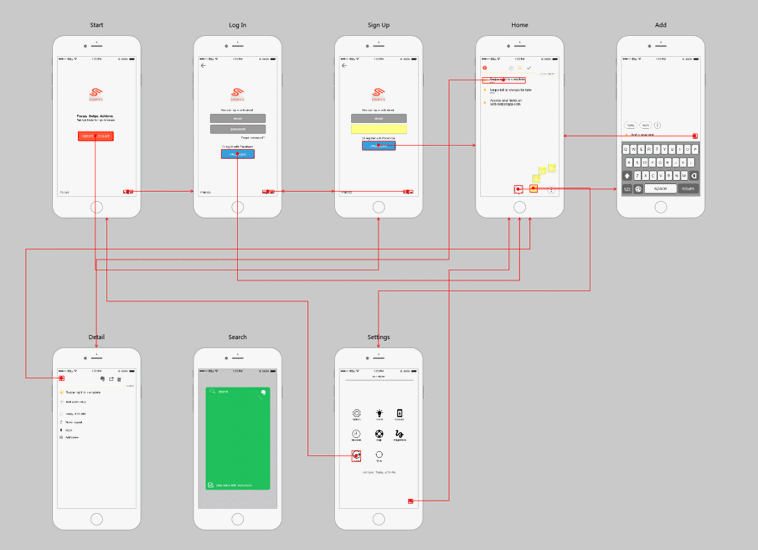
If you want to record and improve your work efficiency, then Swipes is definitely for you. It is an efficiency tool App.The prototype consists of the Signup/Login page and other important pages. Usually, we experience this situation in a Signup/Login page: enter the password and the Login button will change color and turn to workable.
9. South Devon Accounting
Type: Service, App
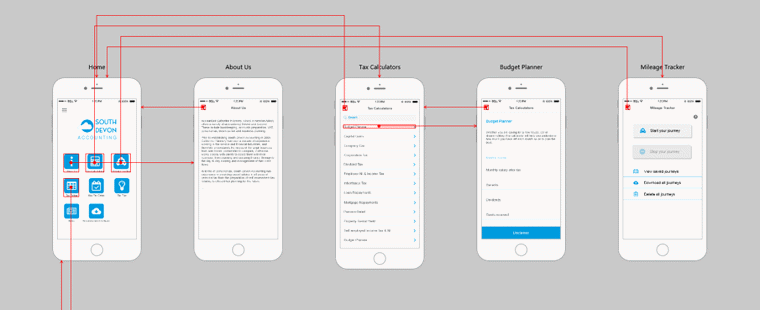
The name is suggesting you the mean of the app. South Devon Accounting App offers accounting and business consulting service. With the main menu consisting of characters and icons, the app layout is clear and simple. Icon button element are used to form the app menu. There are various styles to choose in easy way.
10. Encode
Type: educational App, Tool
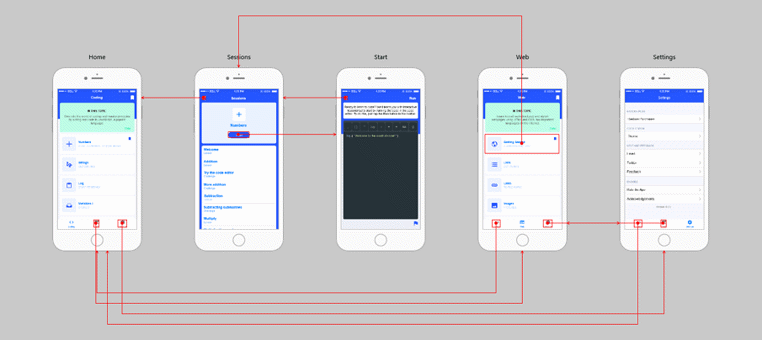
Every future developers want to have an app to learn coding easily. Encode is such an educational App where individuals can learn coding. This system-oriented app make the design color unique and standard. The layout design is both clear and simple. The first page contains the list and one can make such a list easily. Besides, it's a lengthy page so one can view more details by swiping the screen. This can be achieved in two ways: first is the small red slider on pages, the other is the Scroll Box.
11. Weather App
Type: APP, weather
A famous designer, Matt Sclarandis made design of Weather App. It is a collection of wireframes and design for desktop and iPhone weather application.The initial design was done in Adobe Photoshop and Illustrator. And the actual functioning application was programmed in java.
12. Mobile Wireframe Kit
Type: Mobile
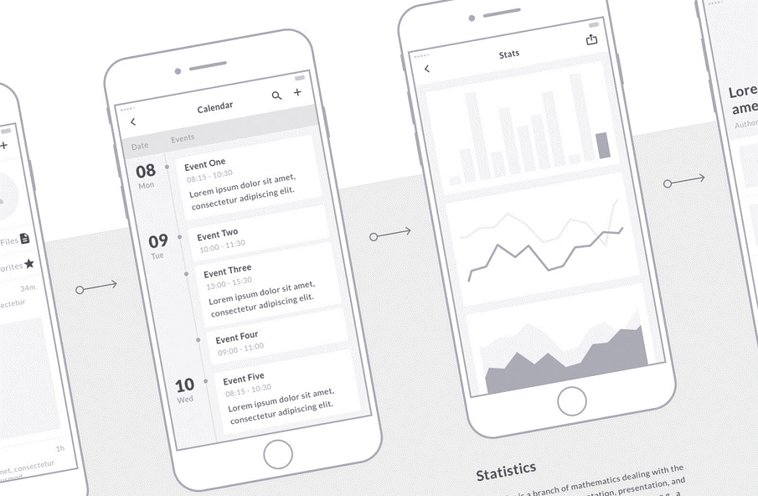
Work smarter and make your dream come true by this Mobile Wireframe Kit. Mobile Wireframe helps you to generate different mobile screens and hundreds of components . It’s also delivered with presentations, flowchart templates or great for UX flows. And the kit is well-organized as always. Each individual layer has been carefully named and all screens are arranged in a collection of 16 categories.
13. User Profile Concept
Type: Profile
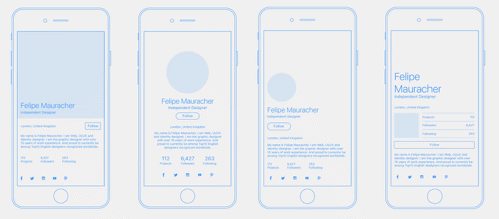
Every design has its own creator. And Tomasz Sochacki was designed this wireframe kit. On the Behance page, we can also find the visual design、the chosen version and the final version of this project.
Why Royex Is the Best Partner for Your Mobile Apps Development
Selecting the right team for your mobile app can shape your business’s future. Plenty of companies build apps, but only a handful know how to turn an idea into something users genuinely care about. This is where Royex stands out. We do more than write code. We help you think clearly, plan wisely, and build an app that feels right for your users.
Royex takes the time to understand your goals. We listen before they design. We study your audience, your challenges, and the results you want. This simple first step makes a big difference. It ensures the app is not created based only on assumptions. It grows from real needs and real expectations. When you work with a team that values clarity, you avoid confusion later. This helps your project move forward smoothly and remain on track.
Another reason Royex is a strong partner is our skill in creating apps that look clean and feel easy to use. A great idea is not enough. People will judge your app by its speed, its layout, and how simple it feels in their hands. Royex pays close attention to each detail. They test, refine, and improve until the app works the way your users expect.
The team also guides you through choices that many businesses struggle with. Which features matter first? How the design should feel. What the long term plan should be. We give honest advice based on real experience. You feel supported at every step.
Royex has earned trust through consistent results. We have worked with many industries and understand what makes each one unique. Our deep experience helps them move quickly and sidestep the mistakes many others make. You get a team that already knows what works and what does not.
Working with a Mobile App Development Company in Dubai like Royex also brings the advantage of a mature market. Dubai is competitive and forward thinking. The team at We applies this mindset to every project. They focus on quality, stability, and long term value. You are not getting quick work. You are getting work that lasts.
When your app is ready, their support does not end. We stay with you through updates, improvements, and new features. We treat your app as a long term product, not a one time project. This ongoing care helps your app grow with your business.
In the end, Royex becomes more than a company you hire. We become a partner who understands your vision and wants to help it succeed. Our clarity, expertise, and ongoing support make us the ideal partner for businesses looking to build a meaningful mobile app. We build the kind of apps that people like to talk about and they use the app again and again. If you want your own mobile app, please feel free to contact with us at [email protected] or call us at +971-56-6027916
FAQs
1. What is a mobile app wireframe and why does it matter?
A wireframe is a simple sketch of your app screen. It shows layout, content blocks, and basic navigation. It does not show color or final graphics. Wireframes matter because they let you test ideas fast. You can change the flow before you build. That saves time and money. They also help the team agree on what the app will do.
2. How are wireframe examples useful when I am starting a project?
Examples give your brain a running start. You can borrow patterns that already work. They highlight common solutions for fixing layout issues. That helps you avoid beginner's mistakes. Examples also speed up decisions. You spend less time guessing. Instead, you adapt what fits your app.
3. What types of mobile wireframes should I look at?
Take a look at low-fidelity and medium-fidelity examples. Low fidelity, rough sketches. They focus on structure and flow. Medium fidelity adds spacing and content size. They make interactions clearer. Also, study flow diagrams that show how screens link. Each type answers a different question. Use low fidelity to explore ideas. Use medium fidelity to refine details.
4. How do I pick the right example for my app idea?
Match examples to your app goal. If your app is content heavy, study wireframes for news or reading apps. When designing a task-oriented app, study existing to-do and utility apps. Check how the example handles navigation and search. Ask if the layout supports your content types. If it does, adapt it. If it does not, take only the parts that help.
5. Which common layout patterns should I know?
Learn a few reliable patterns. Top tabs are good for a few sections. A bottom bar works for core actions. A list view suits feeds and catalogs. Card layouts help show snapshots of content. Each pattern controls attention differently. Pick the one that fits how users will use your app.
6. How do I move from wireframe to prototype?
Pick the strongest wireframes first. Add interaction notes like taps and swipes. Turn screens into clickable frames using a prototyping tool. Test the clicks on a real phone. Watch people use it. Fix flow breaks and confusing bits. Then polish the visual design. Iterate until the app feels natural.
7. How can wireframe examples help with accessibility?
Good examples show clear hierarchy and readable text sizes. Study how they separate content blocks and controls. Use examples that keep contrast in mind and avoid tiny tap areas. Add labels and clear feedback for actions. Wireframes are a good time to plan accessibility. It is cheaper to build in than to fix later.
8. Where can I find high quality wireframe examples and what should I look for?
Look at design communities, portfolio sites, and app pattern galleries. Search for apps that match your category. When you review examples, look for clear flow maps. Check how they solve common tasks in your app. Prefer examples with notes about why a decision was made. That insight helps you adapt, not copy.